

Workday in 2026: AI & Automations Limitations + How to Fix
Workday, AI and Automation: what it does well, where it falls short and how HR teams extend it

Written by
Joris Luijke, Co-Founder & Co-CEO
Workday Strengths & Limitations
Workday is a powerful system of record. Their newer AI features offer real value for core HR, analytics, and workflow assistance. But when teams start exploring end to end automation or employee experience orchestration, Workday hits limits.
Can Workday deliver modern, personalised, cross system automation or does it need help from external tools?
This guide breaks down Workday’s capabilities, limits and the integrations HR teams use to extend it.
1. Workday AI excels at data insight and summarization
Strengths
- Great at summarizing worker profiles, performance data, and job histories
- Reliable for generating draft content such as job descriptions or policy summaries
- Strong analytical suggestions when the data is fully inside Workday
Limitations
- AI quality depends entirely on what lives inside Workday
- It rarely performs well when critical context sits outside the HCM
- It cannot reliably create unified insights that combine HRIS data with Slack, LMS, ITSM, ATS, CRM, or project tools
Managers often operate across Slack or Teams, Jira, Zendesk, LMS, Google Workspace and other tools. Workday AI cannot read these systems, so it loses the context needed to deliver relevant nudges or actions.
2. Workday Journeys and Orchestration tools offer basic automation only
Strengths
- Helpful for simple employee tasks inside the Workday environment
- Good for simple multi step flows such as updating profiles or completing assigned tasks
- Native experience for employees already inside Workday
Limitations
- Journeys cannot orchestrate across most of the tools where employees actually work
- Dimensional logic is basic compared to modern automation platforms
- Does not support granular sequencing or real time triggers across multiple systems
- Cannot handle role complexity, regional rules, or team based personalization at scale
- Lacks modern communication capabilities: no tailored Slack or Teams messages, limited email logic, no multi channel branching
A new hire journey inside Workday rarely matches what people expect during onboarding. New hires need Slack channel access, calendar invites, laptop provisioning, manager coordination, LMS content, and stakeholder intros. Workday cannot coordinate these ecosystems.
3. Limited ability to run real time triggers
Strengths
- Can trigger workflows based on status changes inside Workday
- Good for predictable changes such as job moves, compensation updates, or hire events
Limitations
- Cannot detect or act on key signals that live outside Workday
- Cannot recognise micro moments such as first pull request, missed learning, or overdue ticket
- Cannot tailor timing based on real usage data
Modern employee experience requires detecting real time moments that matter. Workday cannot do this since it lacks direct integration with the operational tools where moments occur.
4. Communication is restricted and not designed for modern EX
Strengths
- Can send basic emails
- Works well for internal Workday notifications
Limitations
- No Slack or Teams personalization
- No channel based preferences
- No powerful scheduling rules
- No ability to deliver lightweight nudges at the right time, in the right place
- Not built for a multi tool environment
Most companies operate in Slack or Teams, and communication relevance determines engagement. Workday communication falls flat because it cannot meet employees in their flow of work.
5. Integrations are not designed for orchestration
Strengths
- Offers standard HRIS connectors
- Provides access to RaaS (report as a service) feeds
Limitations
- Integrations are read based, not action based
- Cannot reliably push actions into external systems
- Requires significant IT effort to make usable
- Does not allow easy coordination across multiple tools at once
Even when Workday data is synced into another tool, Workday cannot actively orchestrate steps across that ecosystem. Teams still need a dedicated automation platform to coordinate IT tickets, LMS assignments, communications, manager tasks, and multi system workflows.
6. Customization and scale require specialist Workday teams
Strengths
- Enterprise grade security and governance
- Strong options for reporting teams and COEs
Limitations
- Most automations require specialist Workday configuration
- Changes are slow and often delayed by backlog
- Cannot be iterated fast enough for modern employee experience programs
- HR teams cannot self serve
HR teams want to design, launch, and iterate journeys without waiting weeks for a Workday admin. Workday does not support rapid iteration.
7. Workday AI is not built for EX wide workflows
Strengths
- Very strong inside its own platform
- Great for forecasting, data analysis, and content suggestions
Limitations
- Not built to automate cross platform workflows
- Not built for manager enablement
- Not built for employee journey mapping
- Not built for proactive nudges or dynamic moment detection
- Not built for multi channel communication
- Not built for rapid experimentation or personalization
Companies want a connected experience where HR processes feel coordinated across tools. Workday is a strong system of record but not an EX orchestrator.
How HR teams extend Workday
HR teams commonly layer one or more of the following:
• Zapier
• Workato
• Applaud
• Pyn
• Custom extensions built in house
Below are deep dive sections for each.
Zapier
Deep dive into the Workday plus Zapier experience
Workflow automations
OK. Generic no code automation. Zapier uses Workday triggers via API or connectors such as new worker created or job change and runs actions in other tools like Slack, Google Workspace or ticketing. Each automation is separate and must be maintained manually.
Personalisation
OK. Filters and conditional steps support basic branching, but HR needs to design logic flow by flow. Personalisation is possible but fragile when spread across many Zaps.
Ease of use
OK. Simple Zaps are accessible to non technical users. Multi step flows become more complex and often shift to Ops.
Orchestration
OK. Good for event based automations. Not suited for long running journeys across multiple weeks and touchpoints.
Analytics and tracking
Weak. Zapier provides logs, not journey analytics or lifecycle visibility.
System integrations
Strong. Integrates Workday with thousands of applications across collaboration, scheduling, CRM and ITSM tools.
Employee onboarding
OK. Useful for automating account provisioning, welcome messages and calendar invites, but often implemented as many Zaps that must be kept in sync.
Manager enablement
OK. Notifications can be triggered when managers gain new reports or need reminders, but all logic must be manually built.
Company wide communications
OK. Possible via email and chat integrations, but not a true communications platform.
Scale
Best for organisations up to roughly 1,000 employees before complexity and maintenance overhead become painful.
Pricing ($)
Expected annual cost for a 2,000 employee company is typically USD 50k to 100k, including Zapier subscription and the operations time required to maintain 40 to 80 Zaps across onboarding and approximately 30 lifecycle moments. Software fees are moderate, but total cost rises with task volume and ongoing maintenance.
Workato
Deep dive into the Workday plus Workato experience
Workflow automations
Strong. Workato offers enterprise grade multi step workflows for Workday HR, Workday Financials and other connected systems.
Personalisation
Strong. Extensive conditional logic and branching allow advanced tailoring by country, business unit, role or risk level.
Ease of use
Weak to OK. Although low code, Workato is generally owned by IT or central automation teams. HR rarely builds directly.
Orchestration
Strong. Excellent for long running workflows involving Workday, ServiceNow, Okta, Salesforce and many others.
Analytics and tracking
Strong for workflow execution visibility. Less focused on employee journey analytics unless paired with BI tools.
System integrations
Strong. Deep connectors and enterprise integration patterns.
Employee onboarding
Strong. Often used to extend Workday onboarding across IT provisioning, access control and LMS assignment.
Manager enablement
Strong in capability. Workflows can notify and guide managers, though design and maintenance typically sit with Ops.
Company wide communications
OK. Can trigger messages, but Workato is not a communications or content platform.
Scale
Well suited for organisations from around 1,000 employees to global enterprise scale.
Pricing ($$$$)
Enterprise automation at this scale usually costs USD 150k to 250k annually for a 2,000 employee company. Pricing depends on connectors, recipes, data volume and support tiers.
Applaud
Deep dive into the Workday plus Applaud experience
Workflow automations
OK. Applaud is focused on front end experience rather than deep workflow engines. It can surface and orchestrate tasks but depends on Workday workflows underneath.
Personalisation
Strong. Designed to deliver tailored experiences for different personas, roles and locations by pulling data from Workday and other systems.
Ease of use
OK to Strong. More admin friendly than Workday. HR and EX teams can configure much of the experience layer directly.
Orchestration
OK. Effective for unifying experience across tools but not a replacement for workflow engines.
Analytics and tracking
OK. Strongest in engagement and usage analytics of the employee experience front end.
System integrations
Strong. Integrates Workday and other HR or IT tools into a unified digital front door.
Employee onboarding
Strong. Improves the usability and clarity of the onboarding experience sitting on top of Workday.
Manager enablement
OK. Provides manager hubs and surfaced tasks but enablement logic generally sits in underlying systems.
Company wide communications
OK. Helpful as a central portal but not a multi channel communication automation platform.
Scale
Best suited for Workday customers with 1,000 employees and above who want cleaner UX on top of Workday.
Pricing ($$ to $$$)
Annual cost for a 2,000 employee Workday company typically ranges from USD 100k to 200k depending on modules such as portals, case management and mobile experiences.
Pyn
Deep dive into the Workday plus Pyn experience
Workflow automations
Strong. Pyn listens to Workday data changes and triggers automated lifecycle journeys such as onboarding, internal movement, manager transitions, leave and exit workflows.
Personalisation
Strong. Journeys and messages adapt by role, region, tenure, manager, lifecycle moment and many other attributes. Messages can come from the right human sender and land in Slack, email or Teams.
Ease of use
Strong. Built for HR and EX teams to own journeys without requiring Workday configuration changes or engineering involvement.
Orchestration
Strong. Designed for mapping and activating Moments that Matter across the entire lifecycle.
Analytics and tracking
Strong. Tracks message performance, journey completion, manager engagement and lifecycle outcomes.
System integrations
Strong. Integrates with Workday, Slack, email, calendar, LMS and ITSM systems to orchestrate journeys across multiple platforms.
Employee onboarding
Strong. Supports comprehensive onboarding across pre hire, week one, first ninety days, buddies, manager tasks and cohort programs.
Manager enablement
Strong. Provides targeted nudges, checklists and guidance for managers triggered by Workday events.
Company wide communications
Strong. Enables targeted, personalised campaigns and always on lifecycle communications informed by Workday data.
Scale
Ideal for organisations from 500 to 15,000 employees that use Workday and need agile, personalised journeys across channels.
Pricing ($)
Expected annual cost for a 2,000 employee company is usually USD 50k to 100k.
Custom extensions
Deep dive into the Workday plus internal tools experience
Workflow automations
Strong if resourced. Workday Extend and internal engineering enable fully bespoke workflows.
Personalisation
Strong. Any logic can be created, but requires coding and continuous maintenance.
Ease of use
Weak. HR depends on engineering teams for every change.
Orchestration
Strong. In theory unlimited, but in practice complexity makes change slow.
Analytics and tracking
OK. Usually provided by Workday reporting and BI dashboards. Hard for HR to adjust.
System integrations
Strong. Anything with an API is possible.
Employee onboarding
Strong or weak depending on internal prioritisation.
Manager enablement
Strong or weak depending on investment.
Company wide communications
OK. Typically routed through existing platforms with internal glue code.
Scale
Most common from 1,000 to 50,000 employees with internal platform engineering teams.
Pricing ($$$$)
Annual cost is typically USD 250k to 1 million plus in engineering labour for ongoing development, maintenance and governance.
Comparison table and final take
Workday is an excellent HR system of record and provides helpful automation inside its own modules.
But modern HR teams need journey automation, personalisation and cross system orchestration.
This is where Zapier, Workato, Applaud, Pyn and internal tools come in.
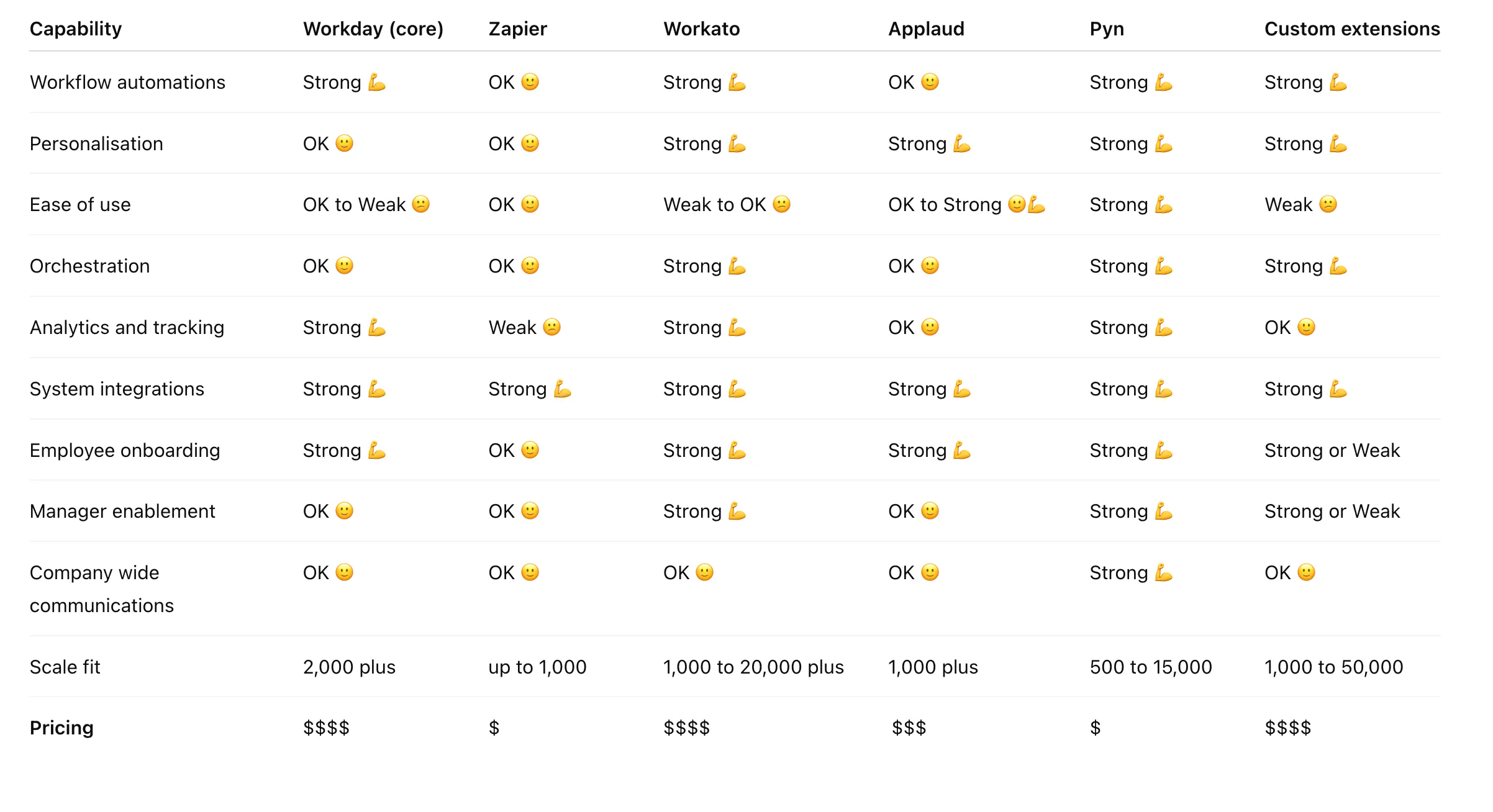
Zapier
- Generic no code automation
- Each Zap/Workflow maintained separately
- Good for smaller Workday setups, hard to maintain at scale
Great for simple no code automation that connects Workday to many external tools. Not ideal for cross system journeys because each automation is separate and requires manual upkeep. Scales best to around 300 to 1,000 employees before maintenance becomes heavy.
Workato
- Enterprise automation
- IT owned workflows
- Best for mid to large enterprises
Great for enterprise grade, multi step automations that integrate Workday with IT, finance, identity, and business systems. Not easy for HR teams to operate because it is usually owned by IT or central automation teams. Scales to very large organisations, often 10k employees and above.
Applaud
- Experience layer on top of Workday
- Personalised portals and task hubs
- Best for 1k to 20k employee Workday customers
Great for creating a cleaner, employee friendly front end for Workday with personalised journeys, hubs, and mobile interfaces. Not strong for deep workflow automation because it depends on underlying Workday flows or IT owned tools. Scales well in mid to large Workday environments.
Pyn
- Journey mapping and automation
- Personalized lifecycle and company communications
- Great for scaling companies 500 to 15k employees
Great for personalised onboarding, employee journeys, manager nudges, and multi channel communications triggered by Workday data (or data outside Workday). Easy for HR teams to run without engineering or Workday configuration changes. Scales smoothly from 500 to over 15k employees, with a pricing model that stays accessible.
Interested in getting more out of Workday?
If you want Workday to do more than handle core HR data, Pyn is a natural extension. It turns Workday events into personalised journeys, manager nudges, onboarding flows and targeted communications that unfold at exactly the right moments.
Companies use Pyn alongside Workday to automate onboarding, reduce manager load and deliver a consistent, high quality employee experience as they scale. No engineering help required and everything is driven by your Workday data.
You can try Pyn for free and see how easily it boosts the power of your Workday setup.
Want to see how? Sign into Pyn and play in the Playground.
Or book a demo and we’ll walk you through a modern onboarding journey!
Joris dreamt of having Pyn as Head of People at Atlassian and Squarespace. Now dreams of getting a sleep-in on Sunday.