

Vibe Coding for HR: A Field Guide
What to build, what to buy, and how to tell the difference without leaking your comp data.

Written by
Joris Luijke, Co-Founder & Co-CEO
Complete our "Should HR Vibe This?" Assessment
Ten quick questions. A straight answer on whether to build it or wrap it.
What changed: HR can now build its own tools
A year ago, if you wanted a custom recognition tool, you had two options. Beg engineering for roadmap space, or buy something off the shelf. Today you open Claude, describe the thing, and have a working version before lunch.
The question changes. It stops being a matter of whether you can build it. Now it's whether you should, and how you decide.
Most HR leaders think they have an AI adoption problem. They don't. They have a visibility problem. Your team already brought AI into the function. Someone is already pasting comp data, grievance notes and candidate details into a consumer chatbot nobody approved, with zero governance around it. The decision to use AI got made for you. What's still yours to make is whether you can see it.
Here's where I've landed after building a dozen of these and talking to HR teams doing the same. The limit on what you can safely vibe-code is not the sensitivity of your data. It's whether you have the discipline to structure your data flows properly. Get that right and the buildable zone is far bigger than most HR teams assume. Get it wrong and you shouldn't be building a recognition bot, let alone anything that matters.
One rule still runs through it:
Vibe-code the rituals. Buy the systems of record.
The rest of this guide is the operating manual, including the part where the line moves.
The three data tiers, and which ones you can build on
The most common mistake I see: teams decide what to build based on how important the tool feels. Wrong axis.
The line is drawn by the data the tool touches, and by what you're prepared to do about it.
Three tiers:
→ Ritual and workflow data. Recognition, sentiment pulses, nudges, reminders, career frameworks. Low sensitivity, small blast radius. Build away.
→ Sensitive but bounded. Engagement verbatims, 1:1 notes, a reorg draft before it's announced. Very buildable, once you've decided where the data lives and who can see it.
→ Systems of record. Payroll, comp, contracts, PII, anything a real decision hangs off. Buy these, or build them with a proper engineering process.
Read those tiers as a description of what you need in place, not as a wall. Tier one asks almost nothing of you. Tier two asks you to think about storage and access. Tier three asks for a compliance apparatus that takes a company years to build, which is why buying it is usually the smart trade.
A regulator drew a similar line, which is worth sitting up for. Under the EU AI Act, AI used in employment decisions (recruiting, selection, performance evaluation, promotion, termination) is classified as high-risk, with obligations around human oversight, documentation and logging. The Commission's own guidance splits the field almost precisely along the rituals-versus-record seam. Tools that score, rank, shortlist or decide are in scope. Administrative tools like interview scheduling, CV parsing into a searchable database, or employer-brand advertising tend to fall outside it.
Recognition is not termination. You've been saying it for years. The law now agrees.
The one-page map: vibe-code or buy
Before the nuance, the map I keep coming back to.
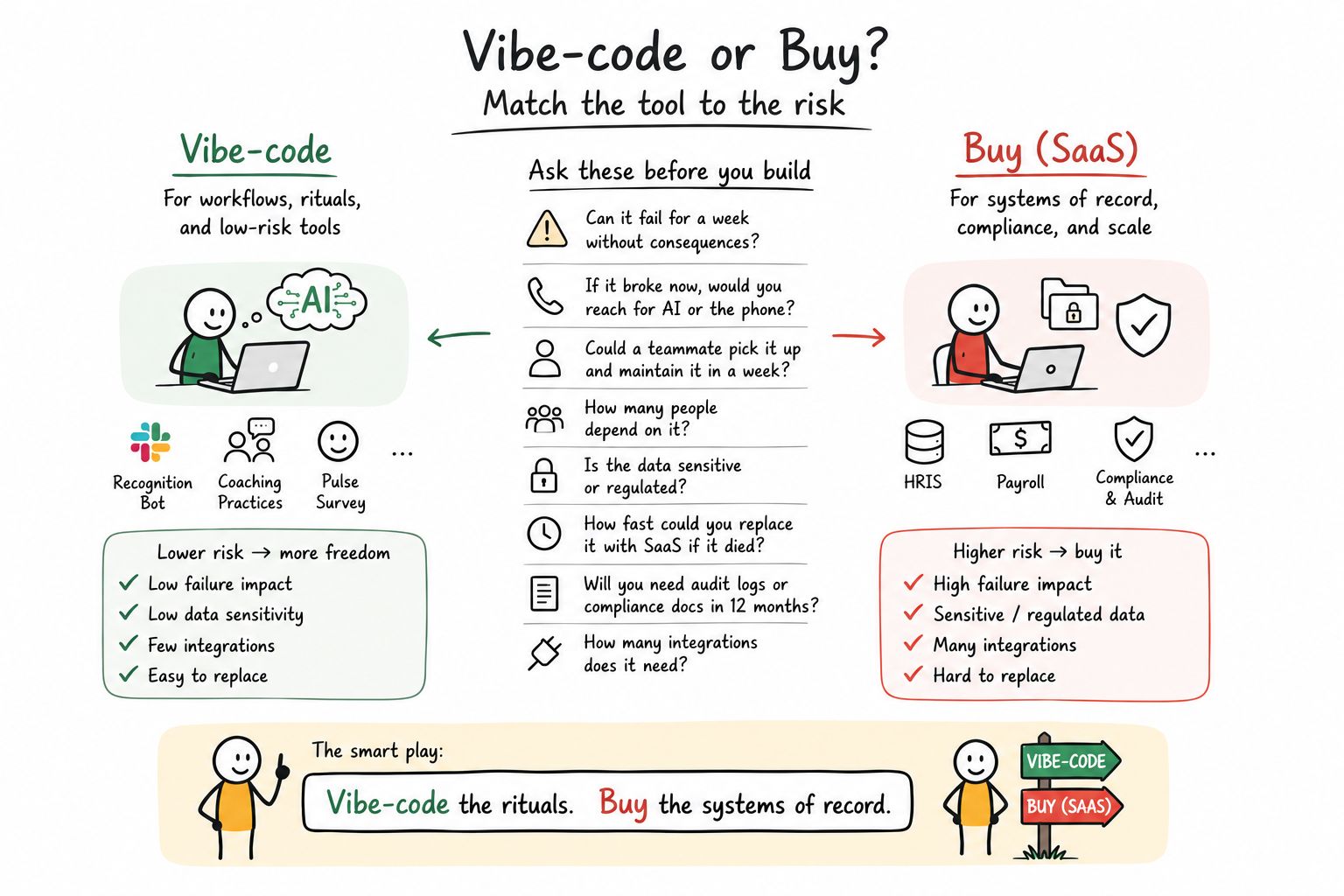
Vibe-code the rituals. Buy the systems of record. The eight questions in the middle are the whole decision.
Left side, you vibe-code. Recognition bots, coaching practices, pulse surveys. Low failure impact, low data sensitivity, few integrations, easy to replace. Lower risk buys you more freedom.
Right side, you buy. HRIS, payroll, compliance and audit. High failure impact, sensitive or regulated data, many integrations, hard to replace. Higher risk, buy it.
The eight questions in the middle are the whole decision. Run any tool idea through them and the answer usually falls out on its own. My favorite is the second one, because it cuts through everything: if this broke right now, would you reach for AI, or reach for the phone?
I learned to trust this the last time my team ran a reorg. We tracked it in a Google Sheet with 14 tabs, three colors of highlighting, and a separate doc explaining what the highlighting meant. Half of us were working off a version that was already out of date. High friction, low data sensitivity, no vendor doing it justice. A textbook thing to vibe-code, so I built (re)org and stopped suffering.
The four-way call: Buy, Wrap, Hybrid or Build
That map is the mental model. Real life is messier, because most HR tools don't sit cleanly on one side. So this is the version I actually use when the call is hard.
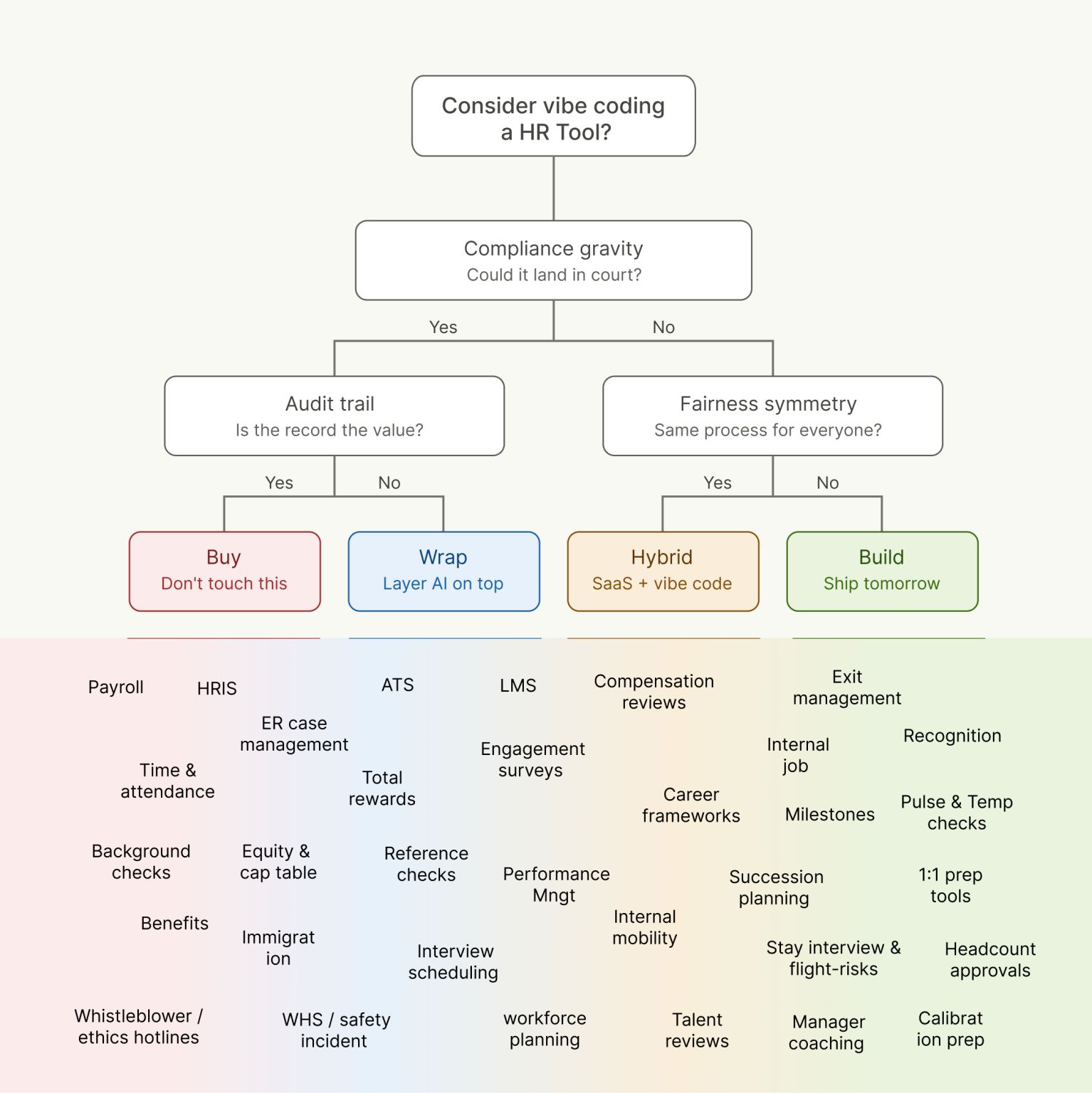
Two questions, four answers: Buy, Wrap, Hybrid, or Build.
Two questions drive the whole thing.
First, compliance gravity. Could this land in court?
If it could, ask one more thing. Is the record itself the value? If yes, you Buy. Payroll, HRIS, time and attendance, background checks, benefits, whistleblower and ethics hotlines. The value of these tools is that the record is complete, defensible, and someone else's liability. Buying is not timidity here. It's refusing to take on a liability you gain nothing from owning.
If the compliance weight is real but the record isn't the whole point, you Wrap. Layer your own AI on top of a system that carries the risk underneath. ER case management, total rewards, equity and cap table, immigration, safety incidents, ATS, reference checks. You get the workflow you want without owning the dangerous part. Wrap is where most teams underestimate themselves. There is a lot of building available in this box.
If it couldn't land in court, ask a different question. Is the process the same for everyone?
This one is the sleeper, and it's very HR. Fairness symmetry. When a tool runs the same process for every person, the risk stays low. The moment it starts differentiating between people, deciding who gets what, you've walked into bias and defensibility territory, and the stakes jump.
Same process for everyone, and you go Hybrid. SaaS plus vibe code. Compensation reviews, engagement surveys, career frameworks, performance management, internal mobility, succession planning, talent reviews. Keep the record in a system you trust, and build the ritual and the experience around it yourself.
Different by design, low compliance weight, and you Build. Ship tomorrow. Recognition, pulse and temperature checks, 1:1 prep tools, milestones, manager coaching, stay interviews, exit management. This is the vibe-coding heartland.
Notice what "Build" means here. Not important or unimportant. It means low compliance gravity and a process that treats everyone the same. That safe zone is bigger than most HR teams assume, and three of the four boxes involve you building something.
Six practices that let you build with sensitive data
I posted about some of this and Aubrey Blanche asked the sharpest question I've had on the topic. Paraphrasing: are you only vibe coding the parts of the stack that don't include sensitive data, and how are you handling the ethical and legal requirements that come with the kind of personal data HR handles every day?
Fair challenge, and worth answering properly, because it exposes what most guides on this get wrong. They treat sensitive data as a hard boundary. It's a practice requirement. The teams doing this well are not braver than everyone else. They've structured their data flows so risk never accumulates in the first place.
What I've seen from companies already doing this sensibly:
→ Nobody reinvents compliance. The data sits on top of an already-vetted database. Pyn, Supabase, Airtable Enterprise, your existing warehouse. You inherit its compliance posture instead of spinning up bespoke infrastructure for sensitive data. This is the biggest one by a distance. Most horror stories start with someone standing up their own storage.
→ Ruthless data minimization. Collect only what the tool actually needs. Most HR tools get built collecting everything available, because it's there. A sentiment tool needs a score and a team, not a name and a manager chain.
→ Real transparency with employees. They tell people what's being collected, why, and where it lives. Done properly this beats the average SaaS app, which nobody has ever read the DPA for.
→ Legal and IT in early, not at the end. Most companies already have a checklist for this. Take it and put it straight into your CLAUDE.md so it guides every build from the first prompt, instead of arriving as a veto at the end.
→ Retention limits by default. Auto-delete sentiment data after a quarter. Data you no longer hold is data you can't leak.
→ No PII through LLM APIs. This is the actual bright line, and it's far narrower than "keep sensitive data away from AI."
Do those six things and you can build considerably more than the cautious version of this advice suggests. Skip them and you should stick with SaaS.
Vibe coding does not mean doing things recklessly. The discipline is the price of admission, and it's a much lower price than most HR teams think.
Practical Case Study: Build and stand up a performance review tool
Theory is easy. Say you want to build something more challenging: a performance review tool, for the sake of argument, because it's the request I hear most and it sits right on the interesting edge.
First, scope it honestly.
A review tool is a Hybrid (see assessment). The process is the same for everyone, which keeps risk down, but the compliance gravity is real, because ratings feed pay decisions and terminations and they get pulled into disputes. So decide what your tool is allowed to own before you write a prompt. You can build the cycle, the nudges, the manager prep, the draft notes, the completion tracking? But for the final ratings, calibration outcomes, anything that gets cited when someone is let go you'd still need an audit trail. (if the system is a record for comp/performance decisions, it's in scope for legal discovery)
Then you need somewhere for it to live.
What follows is the stack I use. Note: there are good alternatives to every single one of these. Cursor instead of Claude Code, Neon or Airtable instead of Supabase, Vercel or Render instead of Railway, GitLab instead of GitHub. I'm not claiming these are the objectively correct choices. They're the ones I've built with, they work well together, and they're forgiving when you're learning. Swap any of them for something you already know.
The tools, and why each one is there
✍️ Claude Code builds it. Not the chat window. This version works across your whole project, runs commands, and follows the rules you write down once in a file called CLAUDE.md, so your data classification and legal guardrails apply to every prompt instead of only the ones you remember. (Your existing subscription.)
↳ The catch: CLAUDE.md is guidance, not enforcement. The model can ignore it, and there's no audit trail proving it didn't.
🗄️ SUPABASE is where the data lives. Think of it as the filing cabinet, plus the lock. It handles logins, which is code you should never let an AI improvise. And it enforces who-can-see-what at the database level, so "a manager sees only their own team's reviews" is a rule the database itself keeps, instead of a rule your app has to remember correctly in every single place it fetches data. That difference is the whole ballgame for employee data. ($25/month. See the note below on the $599 tier.)
↳ The catch: row-level security is off by default. One unprotected table and everyone reads everyone's reviews. Policies also need testing per role, and almost nobody tests the negative cases, which are the ones that matter.
🪪 GOOGLE LOGIN proves who someone is. If you're on Google Workspace, you already have a directory that knows everyone's name, manager and department. Wiring it in means nobody creates another password, and when IT disables someone's account on their last day, they lose access to your tool automatically. (Free, included in Workspace.)
↳ The catch: you have to restrict it to your Workspace domain. Leave that open and any Google account on earth can sign in.
⏰ RAILWAY runs it. Somewhere for the app to actually live on the internet, and importantly, somewhere to run things on a schedule. Cycle opens Monday, reminders go out Thursday, chase the stragglers a week later. Most HR rituals are scheduled work, which is why this matters. (About $5 to $20/month.)
↳ The catch: scheduled jobs can double-fire or skip without you noticing.
↩️ GITHUB is your undo button. Every version of the tool gets saved, so when the AI confidently breaks something that worked yesterday, you go back. Non-negotiable, and free. (Free.)
↳ The catch: only an undo button if your commits are clean and frequent. And rolling back code doesn't reverse database migrations or bring back deleted data.
💬 SLACK (TEAMS) is how people actually use it. Adoption dies when employees have to remember a portal exists. The nudge has to arrive where they already are. (Free to build in your own workspace.)
↳ The catch: bot DMs about performance read as surveillance. And notification fatigue kills the ritual anyway, so budget your nudges carefully.
🚨 SENTRY tells you when it breaks. Without it, you find out from an employee, which for an HR tool is the wrong way around. (Free tier is fine.)
↳ The catch: error payloads capture PII and review text by default. You need scrubbing configured and a DPA in place before it touches real data.
✉️ RESEND sends email, for the moments where Slack isn't enough. Optional if you nudge purely through Slack. (Free up to 3,000 emails a month.)
↳ The catch: needs SPF, DKIM and DMARC set up on your domain. Skip that and your mail lands in spam or you gets flagged as spoofing your own company :
🔑 ANTHROPIC API KEY, only if the tool itself calls AI while it's running, say to summarize a manager's notes. Worth knowing this is billed separately from your Claude subscription, which covers you writing code, not your app making calls. Teams get caught by this after they ship. ($5 to $50/month depending on use.)
↳ The catch: no spend cap means a surprise bill. A loop can burn through it fast.
🌐 DOMAIN NAME gives it an address people trust. An internal tool on a proper subdomain of your company site gets used. The same tool on a random string of characters gets ignored, or worse, reported as a phishing attempt. (About $15/year, or free on a subdomain you already own.)
↳ The catch: needs IT and DNS control.
🔍 A TECH REVIEW Not a tool, obviously. But unless you have the capacity in-house, budget someone technical to check the access rules and the login flow before real employee data goes near it. Not to build it. To check it. (Half a day of a contractor's time, $500 to $1,500 once.)
↳ The catch: a one-off review goes stale at the next AI-generated change.
Tooling all in, roughly $35 to $60 a month, up to $660 if you need single sign-on and SOC 2. And a one-off tech review ranging from $500 and $1,500. Missing from the budget is any cost associated with ongoing maintenance, on-call, and who owns it when the builder leaves.
📦 OR USE PYN, if you'd rather not assemble it. If you want something more bundled, Pyn replaces Supabase, Google login, Railway, Resend, the Slack or Teams app and Sentry, and handles them for you. Setup, testing and light support are included, along with single sign-on and SOC 2. You still write the tool. (More on cost below.)
The $25 versus $599 question
Supabase has a tier at $25 and a tier at $599, and the gap between them is the most important number in this whole section. At $25 you get the database, the logins and the row-by-row access control. That covers ritual tools and most sensitive-but-bounded ones comfortably.
At $599 you get single sign-on, a SOC 2 attestation, ISO 27001, audit logging and longer backup retention. That's the tier you need when your own security team asks for evidence, when the tool holds genuinely sensitive employee data, or when a promise is no longer enough and someone wants the certificate. It sounds like a lot next to $25. It's a fraction of what building that posture yourself would cost, and considerably less than most HR SaaS.
To be honest though, things like SOC2 come with loads more work that isn't captured here. Upgrading mostly makes the tool more robust. For real compliance, have Pyn host.
The trigger is simple. The moment someone in Legal or IT asks "is this SOC 2," you're on the $599 tier, and you should have been.
Bundled approach: Focus on the vibing without the plumbing
Everything above assumes you want to own the plumbing. Plenty of teams don't.
The alternative is to host these tools on Pyn. You still vibe-code the thing, it's still your tool, but Pyn handles the parts you'd rather not learn: logins and access control, the database, setup, connecting it to your HRIS and Slack, single sign-on, SOC 2, testing before it goes live, and light support when something breaks at an inconvenient moment. $9,000 to set up, $2,000 a year after that.
Whether that's worth it comes down to one question. Do you have someone who can to own auth, access policies, uptime and integrations, and will still be there in eighteen months? If yes, assemble it yourself, it's cheaper and you'll learn more. If that person is really "whoever has time," the maintenance is where it falls over, and paying someone to hold that is the better trade.
Side by side
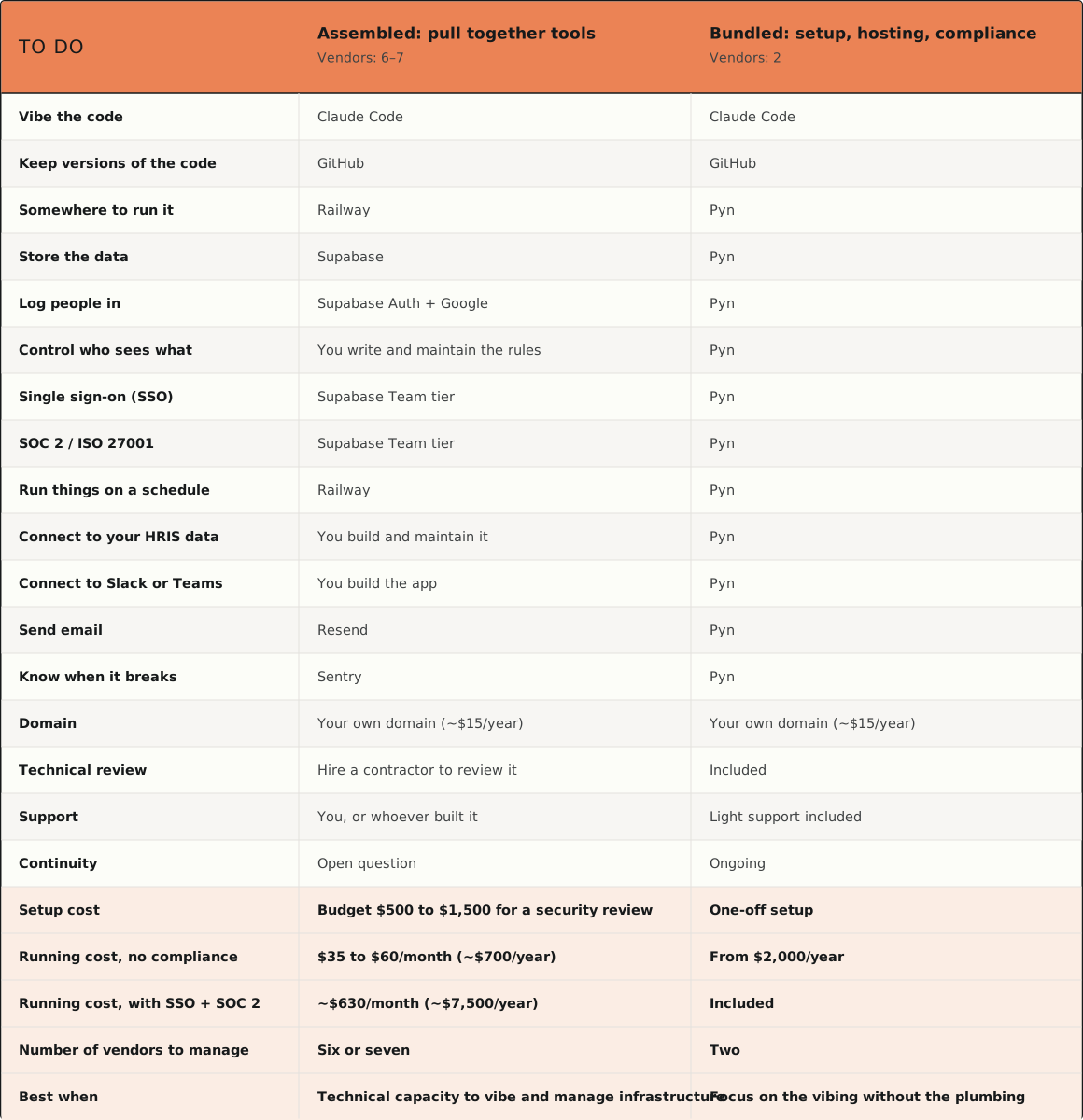
Same tool, same code, two ways to stand it up. The left column is you assembling everything. The right is you still building it, with the plumbing handled.
What you need to stand up an internal HR tool
Build-time vs run-time: when employee data is actually at risk
This is the one that dissolves the objection I hear most. "We can't use AI to build our tools, we can't send it employee data."
You're mixing up two different decisions.
Build time. When you build a tool, you send code to the model, not employee records. You develop against synthetic data. The cloud is fine. Nothing sensitive goes anywhere near the AI.
Run time. The data question shows up later, when a live agent starts reading real employee records to do its job. That's where data residency, on-prem models and access control actually matter.
I learned to draw this line building an offboarding automation demo. I ran it on synthetic BambooHR data, not because building it was risky, but because a live agent reading real records was the real constraint. Build and run are two different rooms. Don't let a build-time fear stop you cold, and don't let a run-time risk slip through because you told yourself "it's only AI writing code."
The clean way to hold it: "is it safe to build this with AI" is almost always yes. "Is it safe to let this thing loose on real data" is the question that deserves your attention, and it has a good answer once you've done the six things above.
Cost: when to use plain automation instead of AI
AI is genuinely great. It's also probabilistic, expensive per run, and hard to observe. So the discipline is boring. Solve as much as you possibly can with plain automation first, and save AI for the parts that actually need judgment or language.
A rules-based workflow, the un-sexy Zapier or n8n or Pyn kind, is cheap, predictable and easy to debug. When it breaks, it breaks the same way every time. An AI agent is none of those things. It costs more every time it fires, it can do something slightly different on Tuesday than it did on Monday, and working out why is real effort.
The number that stuck with me: Uber reportedly burned through its entire annual AI budget in about four months. Probabilistic tools have a way of running up a tab while you're looking the other way.
So the cost question isn't "AI or not." It's "what's the simplest mechanism that does this job." If an automation can send the reminder, route the request or update the field, use it. Save the expensive, unpredictable, judgment-heavy tool for where it earns its place. Automation is boring and cheap. That's exactly why you reach for it first.
Visibility: what to track once you have several tools running
The trap is simple. You vibe-code one tool. Then five. Then thirty automations are firing across your org and you've lost the thread. You can't see what's running, who it's reaching, or whether any of it works.
Congratulations. You've rebuilt shadow IT. It just has your logo on it now.
The fix is to build the seeing-in from the start. Three things every tool should surface:
→ Who is experiencing what. Which employees and managers actually receive, see and use the thing.
→ What's firing. Which AI calls and automations are running, when, and how often.
→ Outcomes. Not vanity metrics. Completion, readership, and non-compliance, meaning who was supposed to do the thing and didn't.
That last one is the sleeper feature. Most HR tooling can tell you what happened. Very little can tell you who didn't do what they were required to. As HR AI gets more documented and logged, being able to answer that moves fast from a nice dashboard to an audit trail you're glad you kept.
Before you ship a tool, decide how you'll watch it work. If you can't answer "who experienced this, and what happened," you haven't finished building.
Integration: getting data out of one tool and into the next
A vibe-coded tool that hoards its own data isn't an asset. It's an island, and islands are where value goes to die.
The sentiment score, the recognition signal, the reorg decision, the completion data. Most of it only becomes valuable when it flows, into the next tool, into the manager's context, and where it belongs, into the system of record. A recognition tool that never tells your talent process who's holding a team together is a nice toy. Wire that signal into performance and succession, and it becomes leverage.
So design every tool with an off-ramp from day one. An export, an API, a webhook. Decide on purpose what flows where. What syncs back to the record. What stays local and never leaves the browser. What feeds the next ritual.
This is where the real prize sits. You don't win by owning payroll. Someone already does, and you shouldn't want to. You win by owning the context layer that sits across everything, the connective tissue that knows who's experiencing what, so every tool you build gets smarter because the others exist.
Vibe-code the rituals, buy the systems of record, then own the layer on top.
Maintenance: what you can fix yourself, and what you can't
For a smaller business, a $500 a month SaaS tool feels expensive. A weekend of Claude prompts feels free. Both are wrong.
The build is 20% of the work. Maintenance is the other 80%. Hosting, auth, logs, audit trails, the integrations that break when a vendor changes an API without telling you. None of it is glamorous. All of it is required.
The good news is a genuine reframe. Most of that maintenance is now vibe-maintainable. HR teams over-price the whole thing because they picture maintaining it like fragile enterprise software, precious and dangerous to touch. Usually it isn't. You can fix, tweak and extend these tools the same way you built them. Don't be so scared of the code that you won't change it.
The real counterweight: some things you cannot vibe-maintain. Authentication, PII handling, real integrations, audit logging. The moment a tool crosses into that territory, "I'll just prompt a fix" stops being good enough. Knowing which category you're in is the actual skill, and inheriting your database's posture takes most of that burden off your plate before it starts.
And ask the unglamorous question early. Who owns this when Sarah leaves? A tool that lives in one person's head is a fragility, not an achievement.
Security: how much rigor each type of tool needs
The scary stat is real. One security firm's scan of thousands of deployed vibe-coded apps found roughly one in three shipped with a serious, exploitable flaw. Study after study finds AI-generated code carries meaningfully more security defects than human-written code. Leaked secrets, injection holes, broken access controls.
Don't read that as a reason to stop building. Read it as blast radius. A SQL injection flaw in a recognition wall leaks kudos. The identical flaw in a comp tool leaks salaries. Same defect, completely different consequence. Match your rigor to your data tier, which is why you classified the data first, and why inheriting a vetted database matters so much. A good share of those one-in-three failures are infrastructure the builder should never have been standing up in the first place.
Two things worth burning in:
"It works" and "it's safe" feel identical, and they aren't. AI-generated code can look completely correct while hiding a critical flaw. It runs, so it looks right, and the vulnerability stays invisible until something breaks. For a non-technical builder, that's the whole trap.
Client-side is a real privacy posture, with real limits. Several of my tools are pure client-side apps. No backend, nothing leaves your browser, so there's no pile of employee data sitting on a server. Genuinely safer than typical SaaS for data in transit and for third-party risk. But it's a personal-scratchpad posture, not a system-of-record one. Browser storage isn't encrypted at rest, there's no access control, no audit log. Perfect for modeling a reorg. Not where you put anything you can't afford to lose.
When a tool earns its way up a data tier, don't wing it. Bring in a technical partner, a fractional CTO or a dev shop, to audit what's load-bearing and what's fragile. Then graduate it on purpose, from client-side to hosted on real infrastructure, with proper auth, tenancy, encryption, audit logging and role-based access. That's the difference between a weekend project and something a thousand people can safely use.
Eight questions to ask before you build
When you don't want the full tree, run the tool through these eight. They're the questions from that first map, in the order I actually ask them:
- Can it fail for a week without consequences?
- If it broke now, would you reach for AI, or reach for the phone?
- Could a teammate pick it up and maintain it in a week?
- How many people depend on it?
- Is the data sensitive or regulated, and if so, whose infrastructure is it sitting on?
- How fast could you replace it with SaaS if it died?
- Will you need audit logs or compliance docs in 12 months?
- How many integrations does it need?
Question five is the one that moves the most. Sensitive data on infrastructure you stood up yourself is a reason to stop. The same data inside a database that already carries a compliance posture is a reason to keep going.
Five free tools I built for inspiration
Enough theory. Five tools I vibe-coded over the last few weeks. Every one is a ritual. Not one is a system of record. That's no accident. It's the whole point.
Take them however you like. As inspiration, as something to copy outright, or if you'd rather skip the weekend, just use them. They're free.
🔄 (re)org → org charts and reorg scenario modeling. Drag people around, mark exits and unassigned roles, compare scenarios side by side, watch comp deltas update in real time. Runs entirely client-side, so nothing leaves your browser. The right posture for a sensitive reorg draft.
🦘 Dollaroo → peer recognition. Kudos that lives where the work happens, in Slack. The kind of low-stakes, high-warmth ritual no vendor builds well and everyone wants. (The real prize is downstream. Wire that recognition signal into your talent and succession thinking, and you learn who's holding teams together.)
🌡️ Team Temperature → weekly sentiment. A one-tap read on how teams are actually doing. The poll is not the point. The visibility is: a running signal on who's experiencing what, before it shows up in an exit interview.
📉 Drift → quarterly performance check. Yes, "performance" sounds like it belongs in the Buy column. But Drift isn't the system that decides ratings or comp. It's the ritual that notices. People rarely fall off a cliff. They drift, quarter by quarter. A full review cycle spreads attention evenly across everyone, including the people who are already fine. Drift puts the focus on the handful of cases that actually move team performance, so you notice before anyone's surprised. The ritual, not the record.
🌱 Grow → career growth frameworks. Career frameworks without the consultant or the six-figure platform. It's also the cleanest illustration of the build-time and run-time line. Grow is a client-side app, so employee data never leaves the browser. The AI helped me build it. It never sees your people.
Five tools, one pattern. Narrow, internal rituals, each designed to hand its data onward instead of hoarding it, each sitting on infrastructure that already has a compliance posture. That last part is why building them took a weekend instead of a project.
Where this goes next: the context layer
The teams that get this right aren't precious about their code. They're precious about their data flows, and about where their employees' information ends up.
That's the thing worth taking away. The constraint on how much HR can build is not the sensitivity of the data you hold. It's whether you've done the six unglamorous things that stop risk accumulating. Inherit a compliance posture instead of building one. Collect less. Tell people what you're collecting. Get Legal and IT in at the first prompt. Delete on a schedule. Keep PII out of LLM APIs.
Do that, then vibe-code the rituals, buy the systems of record, and build the context layer on top that makes all of it worth more than the sum of its parts.
Most HR teams are playing this far safer than they need to.
Where would you draw the line?